

Carrier Invoice Automation: How to Process Freight and Last-Mile Invoices at Scale
Imagine a warehouse receiving hundreds of boxes every morning.
A carrier may send a PDF with the right invoice number and total, but the shipment reference may be missing. A last-mile courier may bill for a delivery attempt, but the POD may not support it. A freight carrier may include fuel, waiting time, tolls, or special handling charges, but the charge names may not match the internal cost codes your team uses for validation.
Now imagine your team has to approve payment for every box before confirming what was inside, where it came from, whether it was delivered, and whether the extra charges are valid.
That is what carrier invoice processing feels like for freight and last-mile teams.
The invoice arrives as a PDF, Excel file, scanned copy, portal download, EDI message, or email attachment. It may contain shipment IDs, delivery dates, fuel charges, tolls, waiting time, reattempt fees, accessorials, taxes, and manually adjusted totals.
At first glance, it looks like an accounts payable problem.
In reality, carrier invoice automation is a logistics validation problem.
A standard invoice tool can read fields. A good freight invoice automation workflow has to decide whether the invoice is actually safe to pay.
What Is Carrier Invoice Automation?
Carrier invoice automation is the process of receiving, extracting, normalizing, validating, and routing freight and last-mile carrier invoices with less manual work.
It helps logistics and AP teams process carrier invoices at scale by turning messy invoice data into structured, reviewable records. The goal is not just faster invoice entry. The goal is cleaner freight invoice validation before payment.
A strong carrier invoice automation workflow usually handles:
Invoice intake from email, portals, PDFs, Excel files, CSVs, EDI, or APIs
Data extraction from headers, tables, totals, and line items
Normalization of carrier-specific charge names into internal cost codes
Matching against shipments, rate cards, PODs, delivery events, and contracts
Exception detection for duplicates, edited totals, missing metadata, or unsupported
Routing approved invoices into TMS, ERP, or AP workflows
That last part matters.
The invoice should not enter payment simply because the document was digitized. It should enter payment because the invoice has been checked against the shipment reality behind it.
A regular supplier invoice usually confirms a simple commercial exchange: what was sold, how many units were sold, the agreed price, and the final amount due.
A freight or last-mile carrier invoice is different because it is tied to what happened across a shipment or delivery workflow. The invoice may include pickup, delivery, failed attempts, waiting time, special handling, lane, zone, mileage, service level, fuel surcharge, POD, and accessorial details. If any of that context is missing or mismatched, the invoice can look correct on paper but still be wrong for payment.
Effective freight invoice automation goes far beyond invoice capture. The system has to connect invoice data with transportation records, rate logic, delivery events, and supporting documents. A shipment reference may not match the TMS record. A POD may be missing. A delivery reattempt may appear without a supporting event. A fuel surcharge may be based on an older rate. A revised total may not explain what changed.
Last-mile invoice processing adds another layer because charges often depend on stops, zones, delivery attempts, package type, waiting time, address correction, returns, COD handling, or special service requirements. Different carriers may describe the same charge in different ways, which makes reporting and validation harder unless those terms are standardized.
The real challenge is not just reading the invoice. It is normalizing the carrier's billing language, matching it to shipment reality, and validating the invoice before it moves into approval or payment.
The Real Problem Is Variation Plus Dependency
Carrier invoices are difficult for two reasons: they vary, and they depend on other records.
Every carrier may use a different format, charge description, invoice numbering style, surcharge structure, and reference field. At the same time, the invoice has to be checked against shipment records, delivery logs, rate cards, contracts, PODs, and exception notes before it is safe to approve.
That combination is where manual workflows struggle. One invoice can be reviewed carefully. Hundreds or thousands each month cannot be checked with the same consistency. Teams process the obvious fields, approve the clean invoices, and push unclear cases into email threads between AP, operations, and carriers.
That is how exceptions lose ownership. AP waits for shipment context. Operations waits for carrier clarification. The carrier says the invoice is correct. The dispute shows up later, when the invoice is already approved or the customer questions the charge.
Carrier invoice automation should reduce that back-and-forth by making exceptions visible, classified, and traceable before payment.
Carrier Invoice Automation vs Generic Invoice Automation
Area | Generic invoice automation | Carrier invoice automation |
|---|---|---|
Main goal | Capture invoice data and route for AP approval | Validate carrier charges before payment |
Common documents | Supplier invoices, purchase orders, receipts | Carrier invoices, PODs, delivery logs, rate cards, shipment records |
Matching logic | PO, vendor, amount, tax, approval workflow | Shipment ID, BOL, PRO, POD, rate, lane, zone, accessorials, delivery event |
Main challenge | Data entry and approval delay | Non-standard layouts, missing references, charge disputes, unsupported fees |
Risk if missed | Slow AP cycle or duplicate payment | Overpayment, margin leakage, carrier disputes, customer billing issues |
Best workflow | Invoice capture plus approval routing | Extraction, normalization, validation, exception handling, TMS/ERP handoff |
This is the key difference.
Generic invoice automation asks: "Can we process this invoice faster?"
Carrier invoice automation asks: "Can we prove this carrier invoice is correct enough to pay?"
Why TMS and ERP Systems Still Need an Invoice Automation Layer
Most logistics teams already have a TMS, ERP, accounting system, freight audit workflow, or some combination of them. The issue is not that these systems are missing. The issue is that carrier invoices often arrive before the data is clean enough for those systems to use.
A TMS can store shipments, rates, loads, carriers, costs, and settlement logic. An ERP can manage vendors, approvals, taxes, journal entries, and payments. But carrier invoices often enter through inboxes, portals, PDFs, spreadsheets, and revised documents with layouts or line items that do not match internal cost codes.
That is where an automation layer helps. It does not replace the TMS or ERP. It sits before them, extracts the invoice data, normalizes the terms, validates the charges, flags exceptions, and sends clean or reviewed records into the systems your team already uses.
The result is not another disruptive platform change. It is a cleaner handoff into the systems already running the business.
What a Good Carrier Invoice Automation Workflow Looks Like
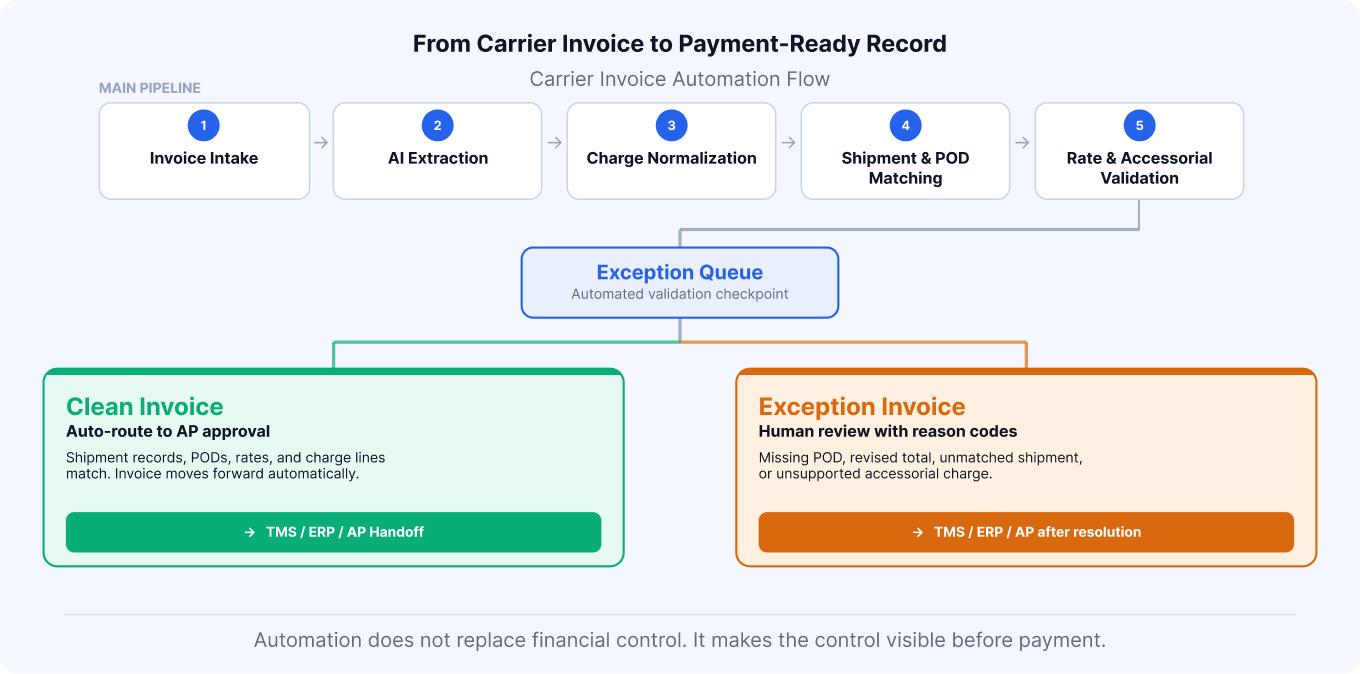
A good carrier invoice automation workflow should move invoices through three checks: capture, normalization, and validation.
The invoice is first captured from email, portal, upload, EDI, or API. The system extracts key fields such as carrier name, invoice number, shipment references, dates, charge lines, taxes, totals, and supporting notes.
Next, the extracted data is normalized. Carrier-specific descriptions are mapped to internal charge categories so terms like "toll," "road tax," and "route fee" do not create separate reporting lines when the business treats them as the same cost type.
Then comes validation. The invoice is checked against shipment records, rate cards, delivery events, PODs, accessorial rules, and approval policies. If everything lines up, it can move forward. If something is wrong, the system should explain the issue clearly, whether it is a missing POD, duplicate invoice number, unknown shipment ID, fuel surcharge variance, unsupported reattempt fee, edited total, or charge line that does not match contract logic.
That explanation is what turns automation from simple document processing into a useful operating workflow.
The Checks That Matter Before Payment
Carrier invoice validation should not rely on a single match. A freight invoice may pass a header check and still fail commercially.
A practical workflow should check the invoice across five layers:
Document integrity: Is the invoice complete, readable, and consistent? Are totals, taxes, and line items aligned? Does the invoice look revised or manually adjusted?
Metadata quality: Are the shipment ID, BOL, PRO number, PO, carrier ID, lane, service level, and delivery date present and usable?
Shipment match: Does the invoice connect to a real shipment, load, stop, order, or delivery event in the TMS?
Charge validation: Do base freight, fuel, accessorials, tolls, waiting time, reattempts, and local charges match rate rules or approved exceptions?
Payment readiness: Is the POD available? Are duplicates cleared? Are variances within tolerance? Has the right person reviewed exceptions?
These checks reduce the risk of paying invoices that look legitimate but are not
Why POD Matching Matters in Last-Mile Invoice Processing
Proof of delivery is more than customer-service documentation. In last-mile invoice processing, it becomes payment evidence.
The POD helps confirm whether a delivery was completed, when it happened, where it happened, and sometimes who received it. That context matters when a carrier bills for completed delivery, failed attempt, waiting time, return, or reattempt. If the POD is missing, mismatched, or linked to the wrong shipment, AP should not have to approve the charge based on trust alone.
Delivery events and timestamps add another layer of control. They help explain whether a failed attempt occurred, whether waiting time is justified, and whether the billed service matches what happened operationally.
Without POD and delivery-event matching, last-mile invoice validation becomes assumption-based. At scale, assumptions are not a payment control.
Why OCR Alone Is Not Enough
OCR is useful because it turns document images into readable text. But freight invoice automation needs more than readable text.
It has to understand tables, line items, charge categories, shipment references, invoice totals, revised amounts, and the relationship between fields. A distorted table may still produce text, but that does not mean the extracted total is reliable. A renamed column may still be readable, but the system must know whether it maps to the right internal cost category. A revised invoice may show a new total, but validation has to identify what changed and whether the change is supported.
That is the difference between document capture and invoice intelligence. OCR reads the invoice. A validation workflow decides whether the invoice is complete, consistent, and safe to move forward.
What to Automate and What to Review
Not every invoice should move through the same path. The best carrier invoice automation workflows use confidence, risk, and business rules to decide what can move forward and what needs review.
Clean invoices can be approved faster when shipment records, PODs, rates, charge lines, and totals match. High-risk exceptions should still go to a human reviewer, especially when there is a missing POD, revised total, unsupported accessorial, duplicate risk, or unclear shipment reference.
The goal is not touchless processing for every invoice. Freight billing is too variable for that to be safe. The better goal is exception-based review, where automation handles the repeatable checks and people focus on the invoices where judgment matters.
Turn Carrier Invoices Into Payment-Ready Decisions
Wend AI acts as an AI validation layer between carrier documents and your existing TMS, ERP, or AP systems.
It helps logistics and finance teams extract invoice data, normalize carrier-specific terminology, match invoices against shipment and POD context, and flag exceptions before payment approval. That makes freight and last-mile invoice processing more controlled without forcing teams to replace the systems they already use.
For teams handling carrier invoices at scale, Wend AI helps turn messy documents into payment-ready decisions.
Book a quick demo with us.
FAQs
Carrier invoice automation is the process of using software and AI to capture, extract, normalize, validate, and route invoices from freight, parcel, courier, and last-mile carriers. It helps teams reduce manual data entry and catch invoice exceptions before payment.
Standard invoice automation focuses on capturing invoice fields and routing approvals. Carrier invoice automation goes deeper by validating charges against shipment records, rate cards, PODs, delivery events, accessorial rules, and carrier agreements.
Freight invoices are difficult because carriers use different layouts, terminology, charge structures, and reference fields. A single invoice may include base freight, fuel, tolls, waiting time, storage, reattempts, taxes, and accessorial charges that need shipment-level validation.
Last-mile invoice processing is the review and validation of carrier invoices for final-mile deliveries. These invoices often include delivery attempts, zones, returns, waiting time, COD fees, address corrections, POD references, and other event-based charges.
Yes. A good carrier invoice automation layer should integrate with existing TMS, ERP, and AP systems. It should not require a full system replacement. The goal is to send clean, validated invoice data into the systems your team already uses.
POD matching helps confirm whether the billed delivery actually happened and whether related charges are supported. It is especially important for last-mile invoices, failed delivery charges, reattempt fees, and customer disputes.
Common exceptions include duplicate invoices, missing shipment references, unmatched PODs, edited totals, unexpected accessorials, rate variances, unsupported delivery attempts, missing metadata, and totals that do not match line items.
No. AI should reduce manual work, not remove financial judgment. The best workflow auto-processes clean invoices and routes risky or unclear exceptions to the right reviewer with clear reason codes.